
Work order templateshvac work order template
HVAC Work Order Template
Use this HVAC work order template when routine maintenance, emergency repair, installation, service description, assigned technicians, materials, labor, tax, totals, and customer/technician signatures need to stay together.
Format
XLSX
Category
HVAC
Use
Download or fill
HVAC work order template
Built-in template
Real sample
A public HVAC job fills an HVAC work order without guessing.
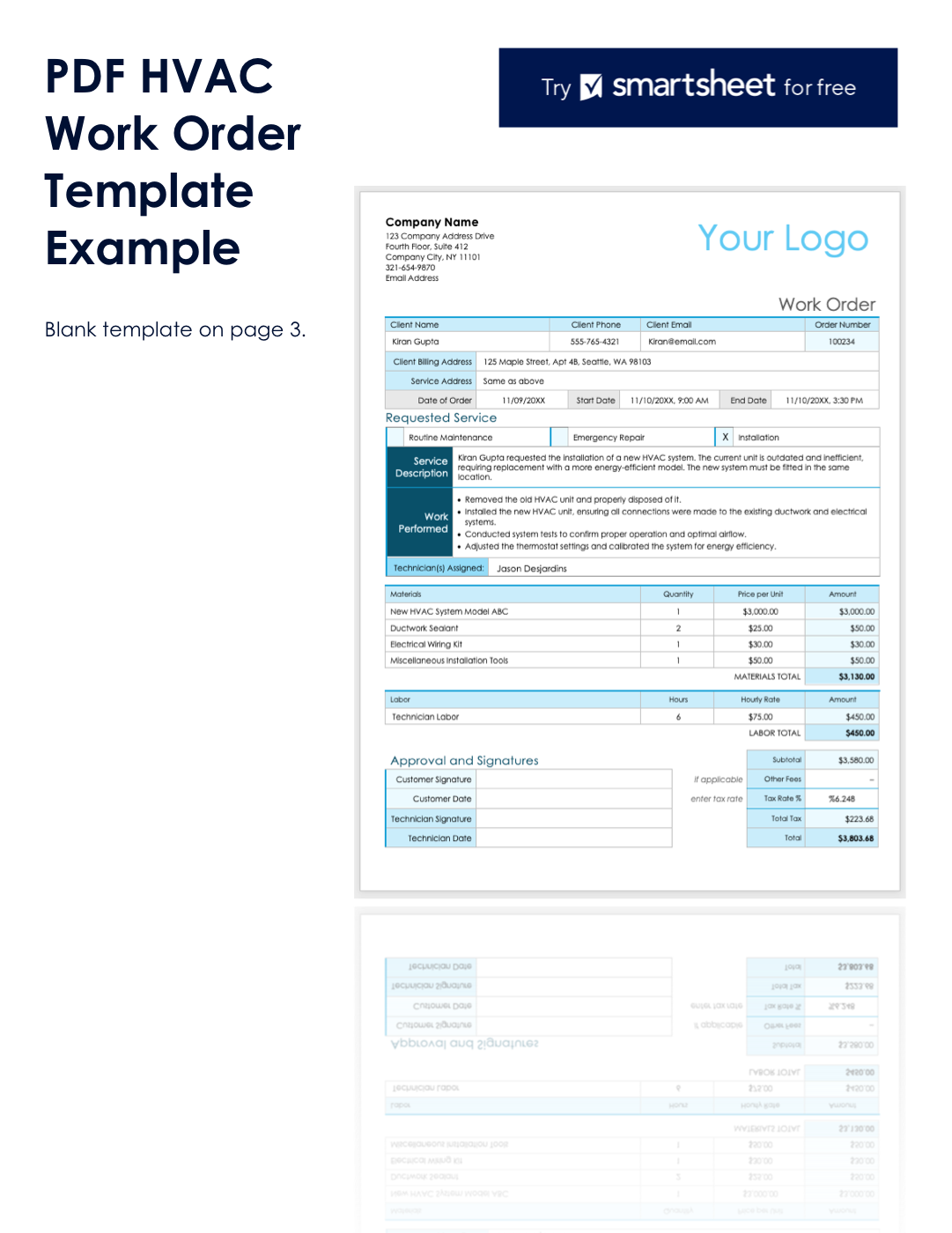
This proof uses a public Smartsheet HVAC work order sample with Installation selected. The runner separated service details, work performed, HVAC materials, technician labor, totals, approval blanks, blank template fields, and disclaimers before filling an HVAC work order template.
CSV rows
52
HVAC work rows
5
Material rows
4
Total amount
$3,803.68
What this source proves
The sample shows the visible fields, row order, totals, and review boundaries used by the filled result. Hidden business facts stay out of the output.
HVAC Work Order Template proof
Download CSVSource-backed work order behavior
Visible job values are mapped, empty template fields stay separate, and missing business values stay blank instead of being guessed.
| source evidence | HVAC template behavior | review boundary |
|---|---|---|
| Installation selected | Requested service, service address, order date, start/end time, and assigned technician stay tied to the HVAC work order. | Routine maintenance or emergency repair is not selected because the source marks Installation. |
| HVAC work performed | The service description and four work-performed bullets become separate HVAC work rows. | Warranty, permit status, inspection result, and completion approval are not invented. |
| Equipment and materials | New HVAC system, ductwork sealant, wiring kit, and installation tools keep quantity, unit price, and amount. | Model metadata, supplier SKUs, and inventory location are not guessed. |
| Labor, tax, and signatures | Technician labor, subtotal, tax rate, total tax, and total remain source-backed cost rows. | Customer and technician signatures stay blank because the source only shows signature fields. |
Fill this template
Turn messy job notes into this workbook.
Upload files or paste job details. Template mode is already attached to HVAC work order template.
HVAC Work Order Template
Upload job notes, service PDFs, screenshots, emails, or technician notes. The selected work order template is already attached.
XLSX structure
Structured work order rows and totals.
The workbook includes a printable Work Order sheet, structured line items, and instructions for filling it from messy job documents.
Client contact details
Billing and service address
Order number and service dates
Requested service type
Work performed and assigned technicians
Materials
Labor
Other cost, tax, and total
Customer and technician signatures
More templates
View all templatesOther work order templates


FAQ
Questions
What is a work order template?
A work order template is a spreadsheet layout for job details such as work order number, customer or department, service location, requested work, tasks, materials, labor, status, cost summary, and approval signatures.
Can I download the work order template as Excel?
Yes. Each built-in work order template is available as an editable XLSX file with source-based workbook sheets, formulas, and printable work order layouts.
Can Messy2Sheet fill a work order template from notes or PDFs?
Yes. Upload job notes, service PDFs, screenshots, emails, or pasted technician notes and Messy2Sheet can fill the selected Excel template with structured rows for review.
Which work order template should I start with?
Start with the general work order template for broad service jobs. Use maintenance, HVAC, plumbing, auto repair, or construction templates when the source belongs to one of those industries.