Supplier price list workflow
Clean supplier price lists into SKU, pack, cost, and update notes.
Open starting pageFirst convert one file, review and fix the table, save the format, then reuse the same fields, cleanup rules, and export shape next time.
Workflows are strongest when the input changes but the output schema stays familiar: the same supplier fields, order columns, invoice tracker, or statement cleanup rules.
Clean supplier price lists into SKU, pack, cost, and update notes.
Open starting pageReuse vendor, item, quantity, terms, freight, and total fields.
Open starting pageCapture order number, customer, SKU, quantity, address, and notes.
Open starting pageTrack invoice number, vendor, dates, line items, taxes, and totals.
Open starting pageNormalize transaction dates, descriptions, debits, credits, and balance.
Open starting pageThese examples are already verified converter/template outputs. The workflow layer should save the columns, cleanup rules, source references, review notes, and export format from a result users have checked, then reuse that shape with the next similar file.
This page does not promise inbox watching, approvals, ERP sync, or invisible background bots. It is about reusing reviewed spreadsheet cleanup rules.

The Phoenix price-list sample keeps SKU, pack, wholesale price, VAT, retail price, effective date, status, and notes as the repeatable layout.
View result CSV
The public VAT invoice sample keeps invoice header fields, supplier/customer details, item rows, VAT, amount due, currency, and payment method.
View result CSV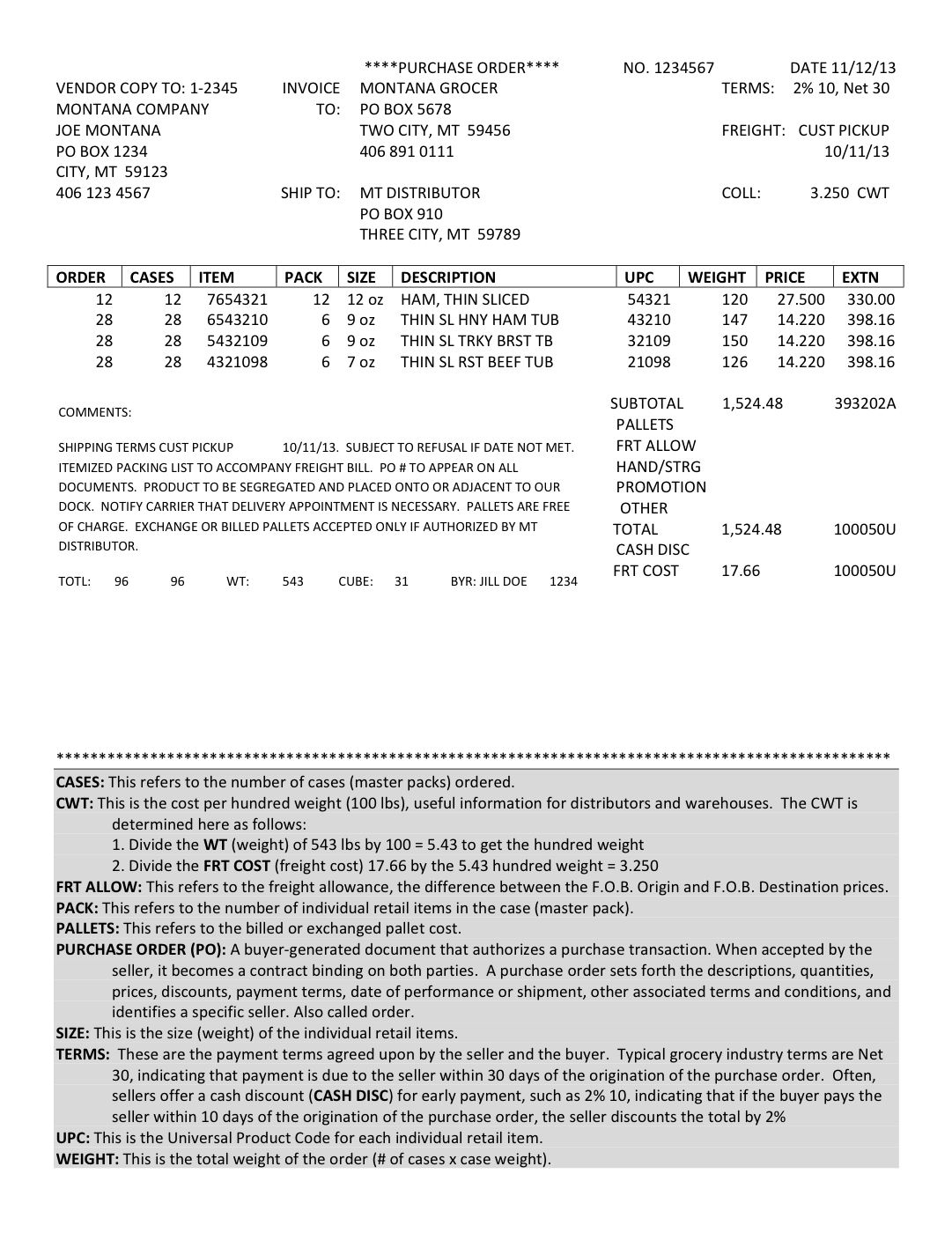
The Montana PO sample keeps ITEM, pack, size, UPC, order cases, unit price, extended price, source page, and review notes without guessing hidden fields.
View result CSVUpload recurring business files or paste notes. After the result looks right, save the accepted columns and cleanup instructions as a reusable workflow from the result page.
Upload repeat business documents or paste notes. The rules are prefilled for workflow-ready cleanup.
Save document cleanup rules once, then reuse them whenever similar PDFs, screenshots, emails, or pasted notes need to become Excel or CSV.
Reuse invoice extraction rules for vendor names, invoice numbers, dates, line items, taxes, totals, and export columns.
Turn repeat receipts, mileage notes, and reimbursement details into the same expense sheet layout each time.
Save cleanup rules for recurring messy data so the next batch follows the same columns, formatting, and export shape.
It starts when you upload files or paste source data.
It reuses saved columns, cleanup rules, and output format.
It exports a new Excel or CSV file for each run.
It does not yet watch inboxes, route approvals, or sync directly into ERP systems.