
Work order templates
Work order templates for Excel.
Download XLSX work orders for service jobs, maintenance, HVAC, plumbing, auto repair, and construction work.
XLSX filesDownload directly
Template modeFill from notes/files
Job rowsTasks, labor, materials
General work order template
XLSX7 templates
A general work order workbook with requestor details, work order ID, location, priority, dates, request notes, completed/incomplete work, materials/labor, and approval.
XLSX templates
Try the general templateWork order template library


Real sample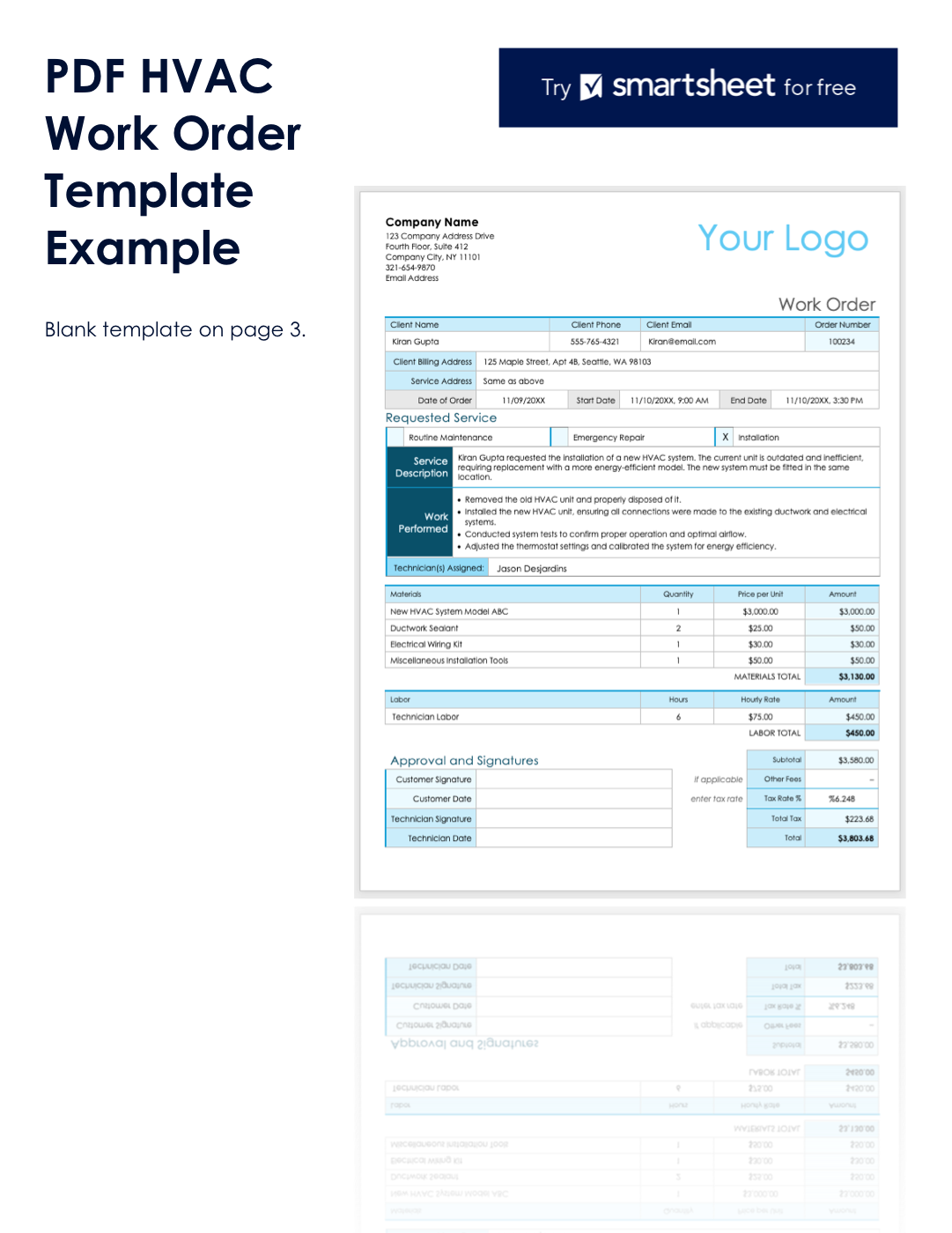
A public HVAC work order becomes reviewable task rows.
This proof uses a public Smartsheet HVAC work order sample. Messy2Sheet extracted work performed, materials, labor, cost summary, approval blanks, and template placeholders into a reviewable CSV without inventing signatures, warranty, invoice status, or accounting treatment.
CSV rows
52
CSV columns
17
Materials
4
Blank fields filtered
27
Source work order: Kiran Gupta, order 100234, installation, materials, labor, tax, and blank signature fields.View source text
Proof table
Generated work order review rows
The output keeps source-backed work order fields separate from blank template placeholders, so a reviewer can use the real job rows without trusting empty example-page fields.
| source evidence | generated row behavior | review boundary |
|---|---|---|
| HVAC work performed | Five work_performed rows preserve service description and technician actions. | No completion approval is created from blank signature fields. |
| Materials table | Four material rows keep item names, quantities, unit costs, and amounts. | The page keeps visible values only: New HVAC System Model ABC, Ductwork Sealant, Electrical Wiring Kit, and tools. |
| Labor and totals | Technician Labor, materials total, labor total, tax, and total are separated for review. | Tax is copied from the source work order; accounting treatment is not guessed. |
| Blank template page | Blank template fields are marked as blank_template_field rows. | Template placeholders and disclaimer rows are filtered out before using work order rows. |
Fill the template
Fill from job notes, PDFs, or service emails.
The form is already set to template mode with General work order template. Upload a work order PDF, field note, screenshot, or dispatch email to create an Excel workbook from this layout.
Common columns
Work order numberCustomerService addressRequested serviceWork performedMaterialsLaborCost summaryApprovals
General work order template
Upload job notes or paste work order details. The selected template is already attached.
FAQ
Questions
What is a work order template?
A work order template is a spreadsheet layout for job details such as work order number, customer or department, service location, requested work, tasks, materials, labor, status, cost summary, and approval signatures.
Can I download the work order template as Excel?
Yes. Each built-in work order template is available as an editable XLSX file with source-based workbook sheets, formulas, and printable work order layouts.
Can Messy2Sheet fill a work order template from notes or PDFs?
Yes. Upload job notes, service PDFs, screenshots, emails, or pasted technician notes and Messy2Sheet can fill the selected Excel template with structured rows for review.
Which work order template should I start with?
Start with the general work order template for broad service jobs. Use maintenance, HVAC, plumbing, auto repair, or construction templates when the source belongs to one of those industries.