01
Upload statement files
Upload a PDF bank statement, readable scan, screenshot, or pasted statement text. Keep all statement pages together so activity rows and summary rows do not get separated.
Convert PDF bank statements, scans, screenshots, and pasted text into source-linked Excel workbooks. Messy2Sheet keeps transactions, balances, service charges, and review notes visible so you can check the source before export.
Built for bookkeepers, finance teams, and analysts who still review bank statement data in spreadsheets. It does not invent merchant categories, tax treatment, reconciliation status, or accounting treatment.

This public demo uses a 6-page Carson Bank sample statement and a clean bank statement Excel template. Messy2Sheet filled 56 activity rows and created 224 source-linked cells, so transactions, balances, and review notes can be checked against the statement pages before export.
Source: Carson Bank sample statement and a clean Messy2Sheet bank statement Excel template. The preview below is a stable screenshot of the same review workspace. Open the interactive review to click workbook cells and inspect the matching statement regions.
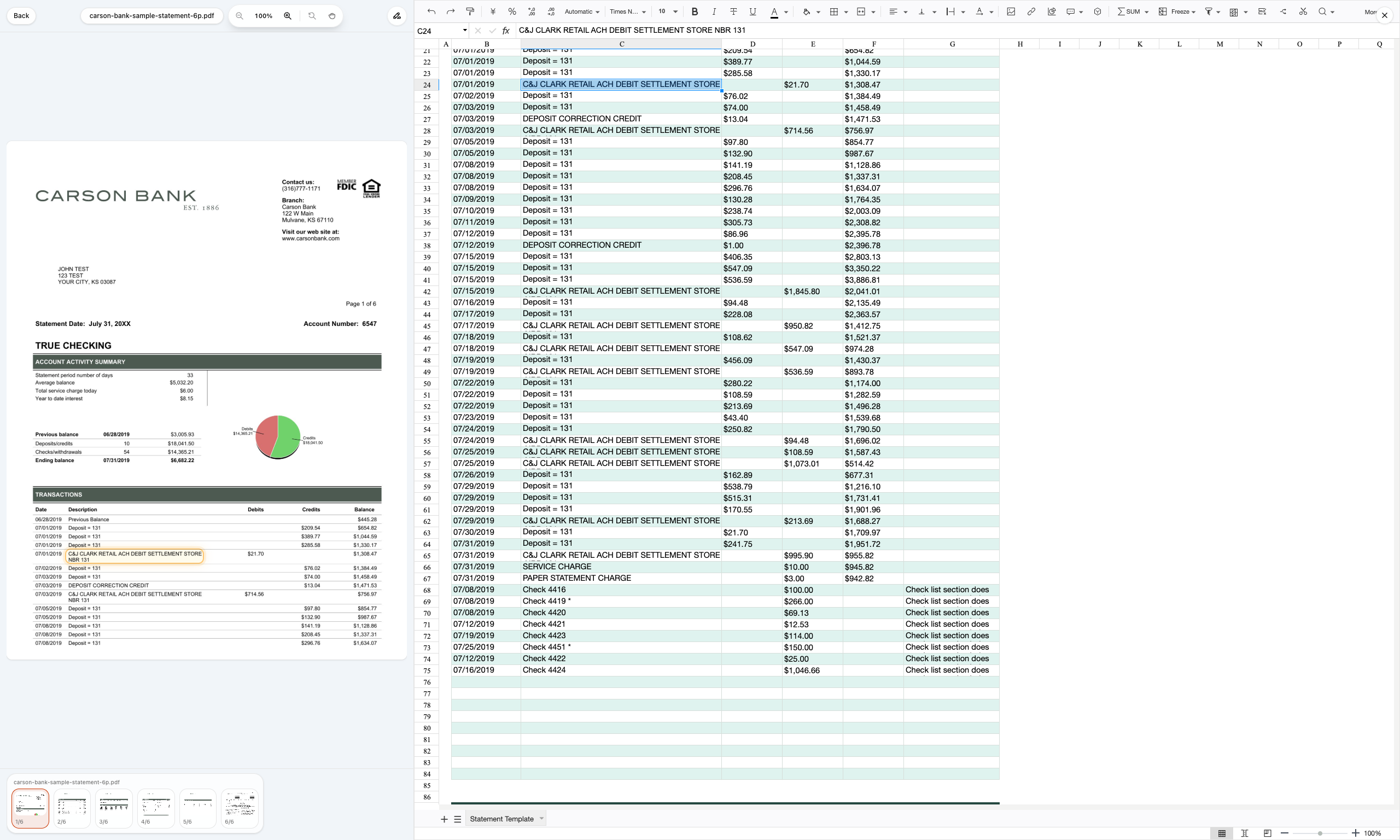
Upload the statement, choose the workbook structure, review source-backed values, then export the accepted Excel or CSV file.
Upload a PDF bank statement, readable scan, screenshot, or pasted statement text. Keep all statement pages together so activity rows and summary rows do not get separated.
Use transaction columns, statement context columns, and review columns so the output is useful in Excel instead of one copied text block.
Keep transactions, daily balances, service charge rows, and statement notes separate before export. Review rows should not be imported as account activity by mistake.
Download an Excel workbook, then save the layout for monthly bank statement cleanup, bookkeeping prep, or reconciliation review.
Use it when statement data arrives as PDFs or scans, and the next step is a spreadsheet your team needs to review, filter, or hand off.
Clean monthly statement PDFs into rows before a bookkeeper imports, reconciles, or filters the data.
Split date, description, deposits, withdrawals, check numbers, and balances into Excel columns.
Run OCR first, then keep unclear statement rows visible for review before exporting the workbook.
Keep beginning balance, ending balance, daily balance, service charge, and note rows out of transaction imports.
Use the same workbook layout when similar statements arrive every month.
Upload a bank statement PDF or paste source text. Messy2Sheet creates an Excel workbook, then lets you save the accepted layout for similar statements.
Upload a PDF bank statement or paste source text. The rules are prefilled for statement-to-Excel cleanup.
Use these pages when the search intent is broader conversion, fixed template columns, or a deeper public sample walkthrough.
Use this broader Excel-output page when the source may be a PDF, scan, screenshot, image, or pasted statement text.
Open pageUse this broader converter page when the goal is bank statement cleanup to CSV.
Open pageUse a fixed bank statement Excel template when the columns must stay consistent every month.
Open pageCompare with a separate Chase PDF-to-CSV walkthrough when the output does not need a fixed Excel template.
Open pageCompare when a simple CSV cleanup workflow is better than bank statement software.
Open pagePDF bank statement to Excel means turning statement pages into spreadsheet rows. Messy2Sheet extracts visible transactions, balances, summary fields, service charge rows, source pages, and review notes into an Excel-ready workbook or CSV layout.
Yes, if the scan is readable. OCR can read the statement image first, then the workflow should separate transaction rows from summary, daily balance, service charge, and note rows before export.
No. The page is built for source-backed extraction and review, not automatic accounting judgment. It should not invent merchant category, tax treatment, reconciliation status, or bookkeeping treatment that is not visible in the statement.
A bank statement contains more than transactions. Beginning balances, ending balances, service charge fields, daily balances, and statement notes should stay reviewable so they do not get imported as false account activity.
A useful output should include a Summary sheet or section, a Rows sheet or table, section, row type, date, description, check number, money in, money out, amount, balance, account number, statement period, source page, and review note.
Use Excel or Power Query when the PDF has selectable, regular tables and you only need a quick import. Use Messy2Sheet when the statement is scanned, spans pages, mixes summary fields with transactions, or needs source-linked review before export.
Yes, but bank statements are sensitive. Review the output before export, remove account numbers or notes your downstream spreadsheet does not need, and read the privacy policy before uploading real financial documents.