01
Upload invoice sources
Upload invoice PDFs, scans, screenshots, or email invoice text. Keep related pages together so header fields, line rows, VAT, and totals stay connected.
Turn invoice PDFs, scans, screenshots, and email text into source-linked Excel or CSV files. Messy2Sheet extracts supplier details, line items, tax, totals, and review notes so your team can check every important cell before export.
Built for invoice review in spreadsheets. It is not a payment approval system, vendor portal, ERP sync, or full accounts payable platform.

This public demo uses a 2-page ReadSoft sample invoice from Anconia Corp. The review workbook shows 32 extracted line items, tax, totals, review notes, and 462 cells linked back to the source invoice.
Review template: Messy2Sheet invoice review workbook. Source invoice: ReadSoft Anconia invoice PDF, from the official ReadSoft sample documents.
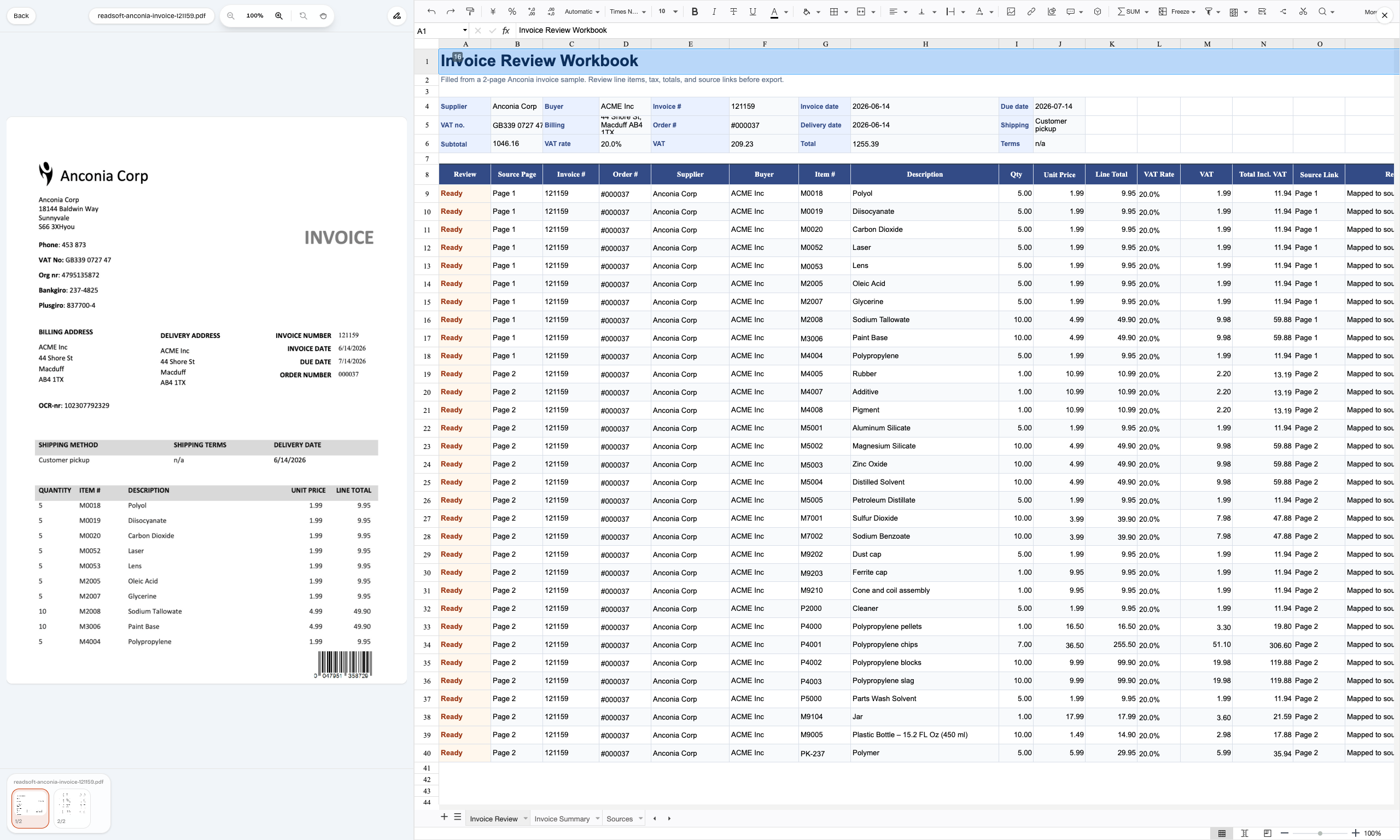
Upload invoice files, choose the workbook structure, review source-backed values, then export the accepted Excel or CSV file.
Upload invoice PDFs, scans, screenshots, or email invoice text. Keep related pages together so header fields, line rows, VAT, and totals stay connected.
Use a review workbook, invoice tracker, CSV import layout, or your own Excel template as the target structure.
Check invoice fields, line items, totals, and unclear values before export. Values that are not visible should stay blank or be marked for review.
Export reviewed XLSX or CSV, then save the workflow for repeated supplier formats or fixed AP spreadsheet layouts.
The output should keep invoice context, line items, tax, totals, and review notes visible, instead of flattening the invoice into one copied text block.
Supplier, customer, invoice number, issue date, due date, PO number if present, payment method, bank account, and currency.
Item description, SKU or part number when visible, quantity, unit price, discount, tax rate, tax amount, and line total.
Subtotal, VAT or sales tax, freight when visible, amount due, total mismatch notes, and source page references.
Use it when invoice data arrives as files or attachments, and the next step is a spreadsheet your team needs to review or import.
Fill invoice trackers with supplier, invoice number, due date, status notes, and amount due without retyping each invoice.
Extract vendor fields, invoice numbers, tax, totals, and line items from PDF invoices into reviewable rows.
Run OCR on scanned invoices, then keep unclear fields visible for human review before export.
Turn recurring supplier invoices into the same Excel or CSV layout each month, then save the accepted mapping.
Upload an invoice PDF or paste source text. Messy2Sheet creates a review workbook, then lets you save the mapping for similar supplier invoices.
Upload an invoice file or paste source text. The rules are prefilled for invoice-to-spreadsheet cleanup.
Not every invoice task needs the full workflow. Use these pages when the search intent is tracker setup, field extraction, OCR, or a simple invoice-to-Excel job.
Build or fill an invoice tracker when your team still reviews AP work in a spreadsheet.
Open pageFocus on extracting invoice fields and line-item data from PDFs, scans, and emails.
Open pageUse a simpler conversion page when the job is mainly invoice PDF to Excel.
Open pageUse OCR first when the invoice is scanned, photographed, or image-only.
Open pageInvoice automation uses software to turn invoice documents into structured workflows. In Messy2Sheet, that means extracting invoice headers, line items, tax, totals, and review notes into Excel or CSV so a human can check the result before export.
Messy2Sheet is not a full accounts payable platform. It does not approve payments, manage vendors, sync to ERP, or schedule payments. It focuses on the invoice-to-spreadsheet workflow before review, import, or handoff.
Yes. Use an invoice tracker, CSV import layout, or Excel workbook as the output structure. Messy2Sheet can fill rows from invoice PDFs, scans, screenshots, or email invoice text.
Yes, if the scan is readable. OCR can turn the image into text, but the important step is reviewing uncertain fields, totals, and line items before exporting the workbook.
Invoice OCR reads text from a scanned or image-only invoice. Invoice automation goes further by arranging the visible fields into a reviewable spreadsheet workflow with headers, line items, totals, and exception notes.
Missing or uncertain values should stay blank or be marked for review. The workflow should not invent approval status, payment status, GL codes, or ERP routing when they are not visible in the source.