
Expense report templatesconstruction expense report template
Construction Expense Report Template
Use this construction expense report template to track job-site spending by expense number and house number with enough detail for review, reimbursement, job costing, and approval.
Format
XLSX
Category
Industry
Use
Download or fill
Construction expense report
Built-in template
Real sample
A public construction expense sheet becomes job-cost rows.
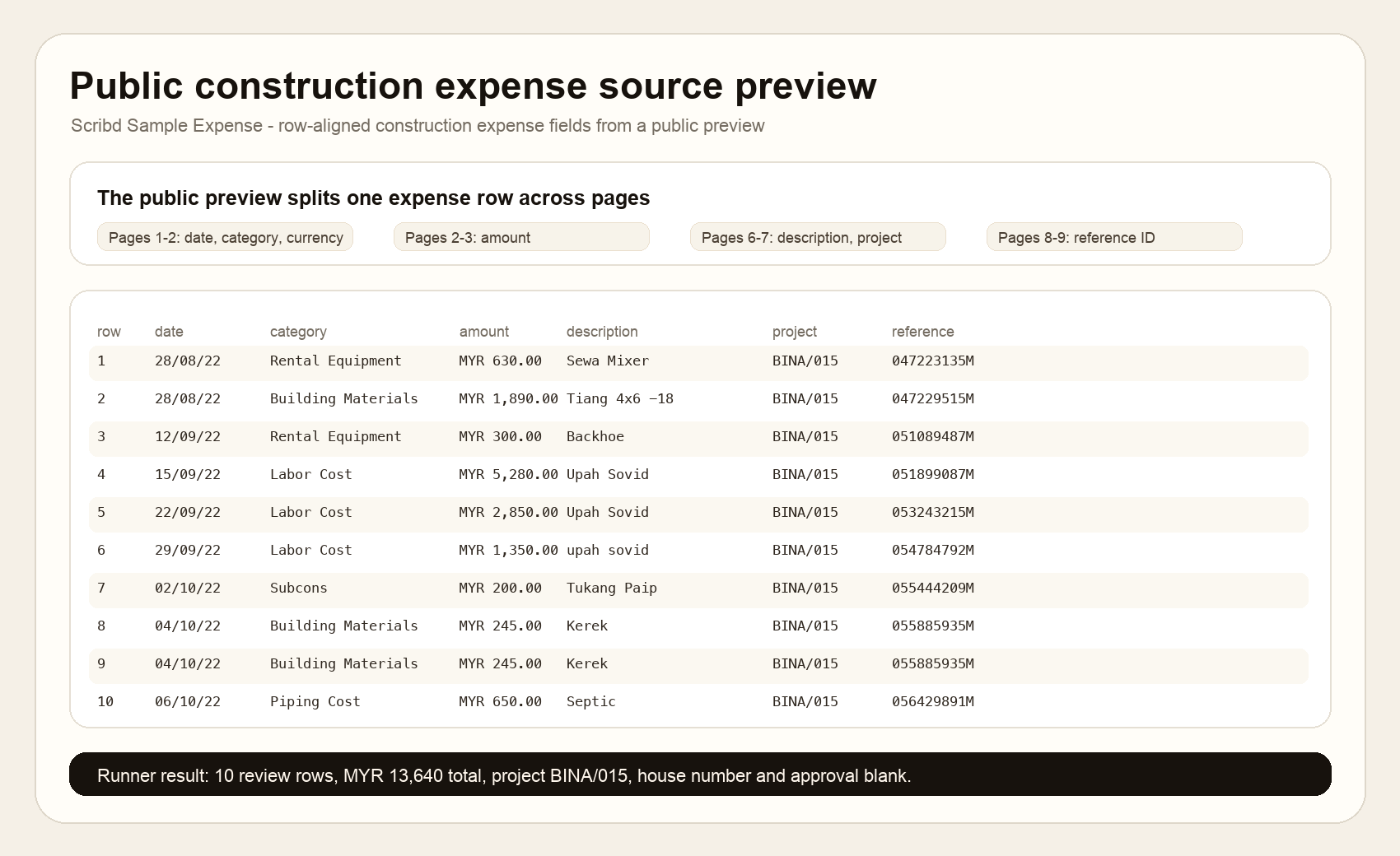
This proof uses a public Scribd Sample Expense preview with construction expense rows split across multiple pages. The runner aligned the first 10 visible rows by source order, kept project BINA/015, dates, categories, MYR amounts, descriptions, and reference IDs, and left employee, manager, pay period, house number, advance, approval, and signature fields blank.
Review rows
10
Project
BINA/015
Total
MYR 13,640
House numbers
0
What this source proves
The sample shows the visible fields, row order, totals, and review boundaries used by the filled result. Hidden business facts stay out of the output.
Construction Expense Report Template proof
Download result CSVSource-backed review behavior
Visible evidence is mapped, follow-up fields stay inspectable, and missing business values stay blank instead of being guessed.
| source evidence | construction report behavior | review boundary |
|---|---|---|
| split source pages | Date/category, amount, description/project, and reference ID are aligned by source row order before the template is filled. | The output does not merge unrelated page columns or infer fields that are not visible. |
| construction categories | Building Materials and Piping Cost become construction_expense_amount rows; Rental Equipment, Labor Cost, and Subcons become other_expense_amount rows. | Category mapping stays visible in review notes instead of pretending the source had the template labels. |
| BINA/015 project rows | The first 10 row-aligned expenses keep project BINA/015, MYR amounts, descriptions, and reference IDs. | Employee, manager, pay period, department, purpose, house number, advance, approval, and signature stay blank. |
| first 10 row total | The preview subset total is MYR 13,640, with MYR 3,030 in construction expense and MYR 10,610 in other expense. | The subset total is not presented as the full 12-page source total. |
Fill this template
Turn messy expense files into this workbook.
Upload receipts, PDFs, screenshots, or pasted notes. The template mode is already attached to Construction expense report.
Construction Expense Report Template
Upload receipts or paste expense notes. The selected template is already attached.
What is included
An Excel layout for construction expense report template.
Download the blank template, or use it as the target shape when Messy2Sheet turns messy receipts, PDFs, screenshots, emails, and pasted expense notes into a structured workbook.
General information: name, manager, employee ID, pay period, title, purpose, and department
Construction expense rows with date, construction expense, other expense, expense number, house number, and amount
Subtotal, advances, and total
Receipt attachment reminder
Approved section
Notes section
More templates
View all templatesOther expense report templates


FAQ
Questions
What is an expense report template?
An expense report template is a spreadsheet layout for reimbursement rows such as date, claimant, category, vendor, amount, receipt number, payment method, and notes.
Can I fill the template from receipts or screenshots?
Yes. Upload receipts, screenshots, PDFs, or pasted expense notes and Messy2Sheet will try to fill the selected Excel template with structured rows.
Can I download the expense report template?
Yes. The built-in templates are downloadable XLSX files. You can also use them directly with your uploaded files.
Can I use my own company expense report format?
Yes. In the template mode, upload your own CSV or XLSX template and use it as the target shape for the generated spreadsheet.