
Expense report templatesmonthly expense report template
Monthly Expense Report Template
Use this monthly expense report template when you need a year-to-date summary plus separate monthly tabs for daily income and expense tracking.
Format
XLSX
Category
General
Use
Download or fill
Monthly expense report
Built-in template
Real sample
Public transaction rows become a monthly expense report.
This proof uses the public DeniseLewis1 personal-finance-dashboard transactions.csv and categories.csv files. The runner filtered December 2024, grouped 44 visible transactions by category, separated income from expenses by signed amount, and kept categories missing from the reference file as review rows instead of forcing a label.
Dec rows
44
Income
$9,163.00
Expenses
$6,554.38
Review categories
2
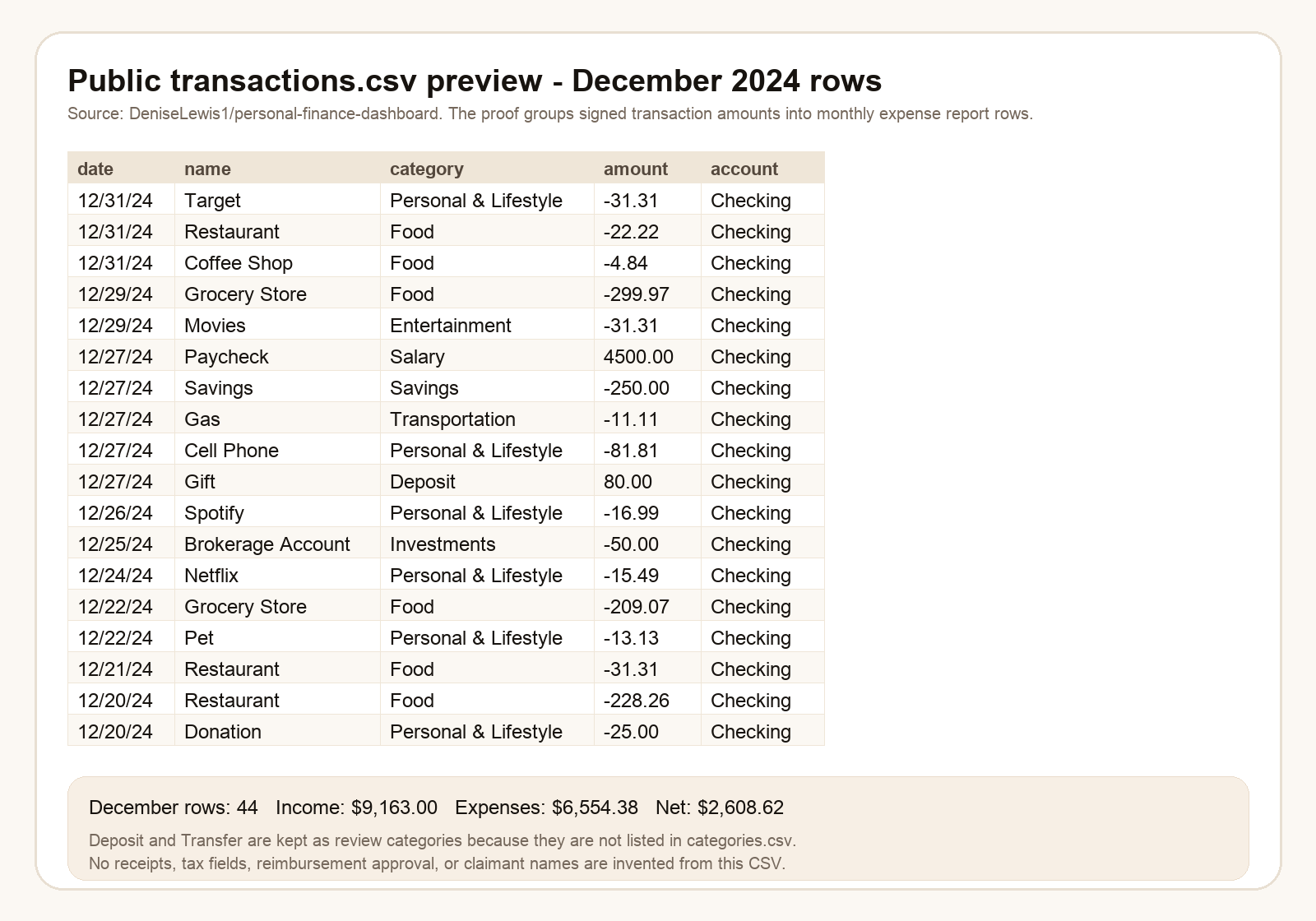
What this source proves
The sample shows the visible fields, row order, totals, and review boundaries used by the filled result. Hidden business facts stay out of the output.
Monthly Expense Report Template proof
Download source CSVSource-backed review behavior
Visible evidence is mapped, follow-up fields stay inspectable, and missing business values stay blank instead of being guessed.
| source evidence | monthly report behavior | review boundary |
|---|---|---|
| transactions.csv | December 2024 rows are grouped by visible category, account, first date, last date, and signed amount. | The output does not invent receipts, tax fields, payment method details, claimant names, or approvals. |
| categories.csv | Known categories such as Salary, Food, Housing, Savings, Transportation, and Personal & Lifestyle keep their reference type. | Deposit and Transfer are visible in the source but missing from the reference, so they stay needs_review. |
| Monthly summary | The page shows income $9,163.00, expenses $6,554.38, and net $2,608.62 for the December tab. | Budget forecast, YTD context, tax treatment, and reimbursement decisions stay blank unless the source proves them. |
| unsupported fields | blank | No project, employee, receipt number, reimbursement status, tax category, or private bank detail is created from source silence. |
Fill this template
Turn messy expense files into this workbook.
Upload receipts, PDFs, screenshots, or pasted notes. The template mode is already attached to Monthly expense report.
Monthly Expense Report Template
Upload receipts or paste expense notes. The selected template is already attached.
What is included
An Excel layout for monthly expense report template.
Download the blank template, or use it as the target shape when Messy2Sheet turns messy receipts, PDFs, screenshots, emails, and pasted expense notes into a structured workbook.
YTD income and YTD expenses
Income categories across JAN-DEC
Expense categories across JAN-DEC
Separate JAN, FEB, MAR, APR, MAY, JUN, JUL, AUG, SEPT, OCT, NOV, and DEC sheets
Daily income amounts by month
Daily expense amounts by month
Housing, utilities, personal, food, transportation, and other category groups
Monthly totals and YTD totals
More templates
View all templatesOther expense report templates


FAQ
Questions
What is an expense report template?
An expense report template is a spreadsheet layout for reimbursement rows such as date, claimant, category, vendor, amount, receipt number, payment method, and notes.
Can I fill the template from receipts or screenshots?
Yes. Upload receipts, screenshots, PDFs, or pasted expense notes and Messy2Sheet will try to fill the selected Excel template with structured rows.
Can I download the expense report template?
Yes. The built-in templates are downloadable XLSX files. You can also use them directly with your uploaded files.
Can I use my own company expense report format?
Yes. In the template mode, upload your own CSV or XLSX template and use it as the target shape for the generated spreadsheet.