Activity rows
Rows for dates, descriptions, check numbers, deposits, withdrawals, fees, balances, and source pages.
Convert bank statements to Excel without retyping transactions. Messy2Sheet turns PDFs, scans, screenshots, images, and pasted statement text into workbook rows for bookkeeping, finance ops, and cleanup teams to review before export.
Direct answer
Bank statement to Excel means converting visible statement data into spreadsheet rows, while keeping transactions, balances, statement context, source pages, and review notes separate so a reviewer can verify the source before export.
This public Carson Bank sample was converted into a Messy2Sheet workbook with 56 activity rows and 224 source-linked cells. The screenshot shows the review workspace: source statement pages on the left, Excel rows on the right.
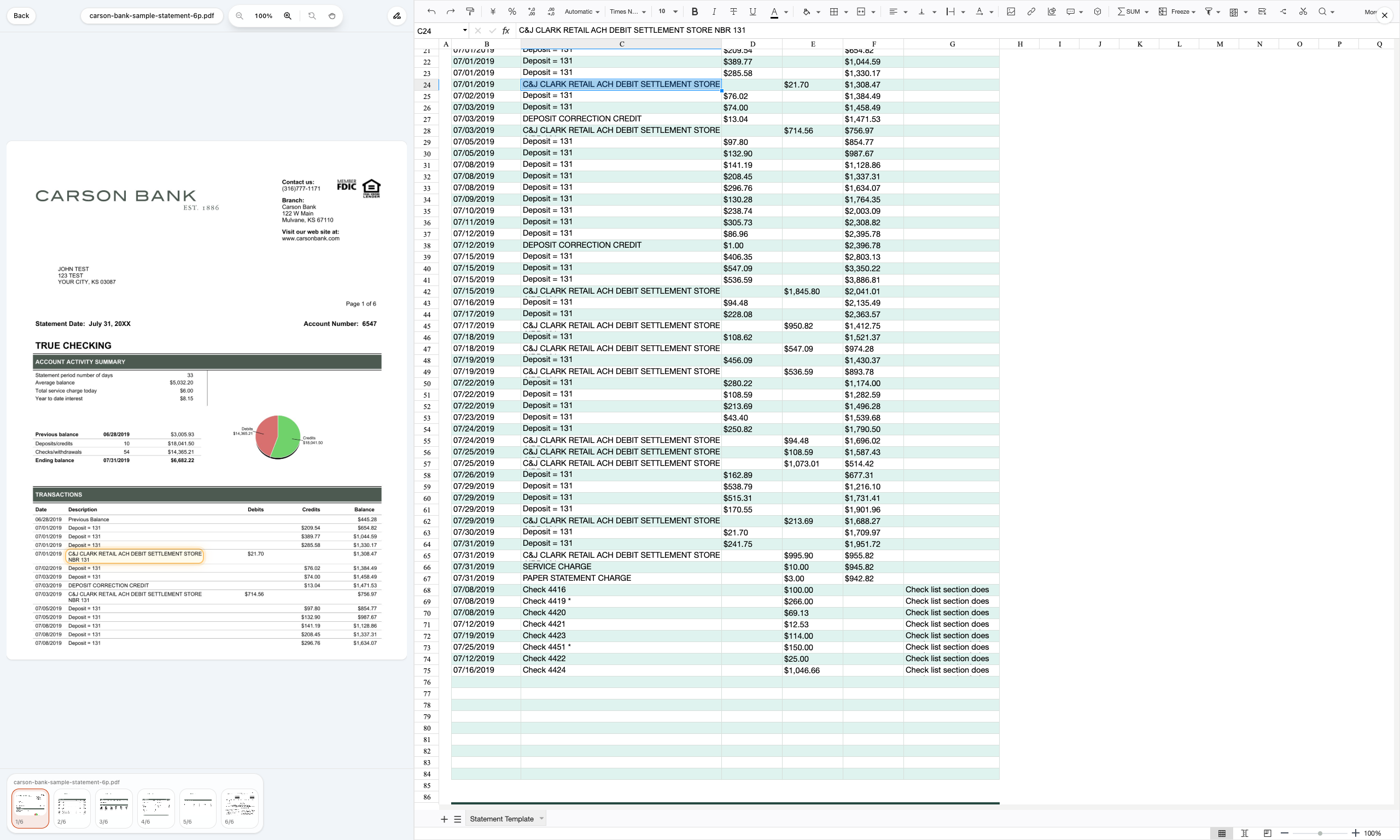
A bank statement is not just a list of transactions. A useful Excel output keeps activity, statement context, and review-only notes apart so the spreadsheet can be filtered safely.
Rows for dates, descriptions, check numbers, deposits, withdrawals, fees, balances, and source pages.
Beginning balance, ending balance, statement period, account context, service charge fields, and section totals.
Daily balances, unclear values, statement notes, cropped fields, and source-backed review notes kept out of transaction imports.
The goal is not only OCR. The goal is a workbook your team can inspect, filter, export, and reuse for the next statement.
Upload a PDF statement, readable scan, screenshot, statement image, or pasted text. Keep all pages together so summary rows and transactions stay in context.
Ask for Excel columns that separate transaction rows, statement context, balances, source pages, and review notes.
Check important values against source evidence before export, especially balances, fees, check rows, and statement notes.
Download the workbook, then reuse the accepted layout for the next statement from the same bank format.
This page is the Excel-output entry point. Use the related pages when your intent is specifically PDF review, one-off CSV cleanup, or a fixed monthly template.
Use this page when the search intent is broad: turn a bank statement into an Excel workbook you can inspect, filter, and reuse.
Open pageUse this when the input is specifically a statement PDF and you want the source-linked review workspace shown in the proof.
Open pageUse this when you only need one-off CSV cleanup rows that open cleanly in Excel.
Open pageUse this when the monthly output must always land in the same fixed columns.
Open pageUpload a statement or paste text. The preset asks for workbook rows that preserve transactions, balances, source pages, and review notes without adding accounting guesses.
Upload a bank statement PDF, scan, screenshot, image, or pasted statement text. The rules are prefilled for statement-to-Excel cleanup.
Bank statement to Excel means turning statement files into spreadsheet rows. A useful workbook keeps transactions, balances, statement context, source pages, and review notes separate so a person can inspect the source before using the data.
Yes, if the scan or screenshot is readable. OCR can read image-based statement pages first, then Messy2Sheet can structure the visible values into Excel rows for review.
Use Excel output when you want multiple sheets, reusable workbook structure, review columns, or source-backed handoff. Use CSV when you only need a simple transaction table for another system.
No. This workflow is for source-backed extraction and review. It should not invent merchant category, tax treatment, reconciliation status, GL code, or accounting treatment when those fields are not visible.
A practical workbook should include date, description, check number, money in, money out, amount, balance, account context, statement period, source page, row type, and review note.
Yes. After one workbook looks right, save the accepted rules as a reusable workflow for the next monthly statement from the same bank layout.