
Purchase order templatesrestaurant purchase order template
Restaurant Purchase Order Template
Use this restaurant purchase order template when kitchen teams need to turn food, beverage, and supply reorder notes into a vendor-ready order guide with par, on-hand, quantity-to-order, delivery day, and item totals.
Format
XLSX
Category
Restaurant
Use
Download or fill
Restaurant purchase order template
Built-in template
Real sample
A public restaurant order guide becomes order review rows.
This proof uses the public TouchBistro Restaurant Order Guide Template. The sample is not treated as a finished vendor purchase order: its header area contains placeholder labels, while the vendor sheet has three visible order guide rows with product code, par, on-hand count, quantity to order, unit price, total price, and delivery day.
Source rows
3
CSV columns
21
Calculated total
$170.82
Blank header fields
5
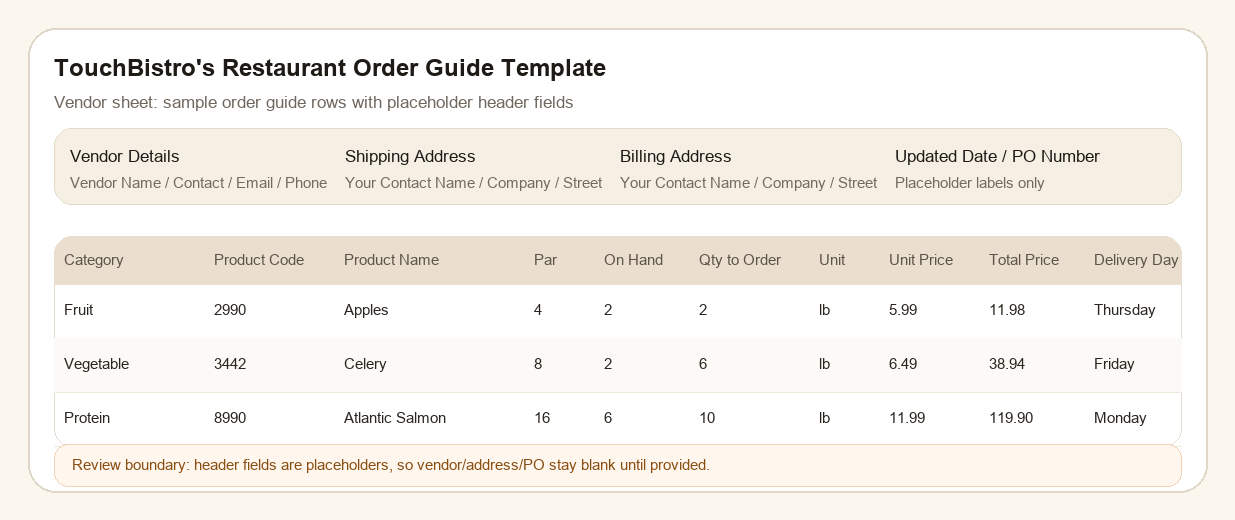
What this source proves
The sample shows the visible fields, row order, totals, and review boundaries used by the filled result. Hidden business facts stay out of the output.
Restaurant Purchase Order Template proof
Download source XLSXSource-backed field behavior
Visible fields are mapped, formulas and review notes stay inspectable, and hidden business facts are not invented just to fill empty cells.
| field | value | restaurant PO behavior |
|---|---|---|
| Apples | 2 lb at $5.99 | Keeps product code 2990, par 4, on-hand 2, quantity to order 2, total price 11.98, and Thursday delivery. |
| Celery | 6 lb at $6.49 | Keeps product code 3442, par 8, on-hand 2, quantity to order 6, total price 38.94, and Friday delivery. |
| Atlantic Salmon | 10 lb at $11.99 | Keeps product code 8990, par 16, on-hand 6, quantity to order 10, total price 119.90, and Monday delivery. |
| unsupported fields | blank | Vendor name, shipping address, billing address, updated date, and PO number stay blank because the source only shows placeholder labels. |
Fill this template
Turn supplier files into this PO workbook.
Upload files or paste buying notes. Template mode is already attached to Restaurant purchase order template.
Working from a full PO packet instead of one template? Use purchase order automation to map the packet before filling rows.
Restaurant Purchase Order Template
Upload supplier quotes, purchase request emails, PDFs, screenshots, price lists, CSV exports, or pasted buying notes. The selected purchase order template is already attached.
XLSX structure
Purchase order rows, formulas, and approval fields.
The workbook includes a printable Purchase Order sheet, structured line items, and instructions for filling it from messy purchasing documents.
Vendor details
Shipping / kitchen address
Billing / accounting address
Updated date and PO number
Category dropdown
Product code and product name
Par and current quantity on hand
Quantity to order and order unit
Unit price and total price
Delivery day dropdown
Additional notes
More templates
View all templatesOther purchase order templates


FAQ
Questions
What is a purchase order template?
A purchase order template is a spreadsheet layout for PO number, buyer, vendor, ship-to address, SKU or item, description, quantity, unit price, tax, freight, terms, approval, and status.
Can I download the purchase order template as Excel?
Yes. Each built-in purchase order template is available as an editable XLSX file with a printable Purchase Order sheet and a structured Line Items sheet.
Can Messy2Sheet fill a PO template from supplier quotes?
Yes. Upload supplier quotes, PDFs, emails, screenshots, price lists, or pasted buying notes and Messy2Sheet can fill the selected Excel PO template for review.
Which purchase order template should I start with?
Start with the basic purchase order template for general buying. Use vendor, construction, restaurant, or inventory templates when the source belongs to one of those workflows.